
The Quote Generator is a web-based tool designed to create and download professional quotations in PDF format. It allows users to input customer details, add line items, calculate totals (including VAT if applicable), and generate a downloadable PDF with a formatted quotation. This documentation provides a comprehensive guide to using and customizing the Quote Generator.
Table of Contents
- Features
- How It Works
- Code Structure
- Customization
- Dependencies
- Usage Instructions
- Troubleshooting
- License
1. Features
- Customer Details: Capture customer information such as name, company, VAT registration number, phone, and address.
- Line Items: Add multiple products or services with quantities, prices, and line totals.
- Automatic Calculations:
- Subtotal
- VAT (15%) if a VAT registration number is provided
- Grand Total
- PDF Generation:
- Includes a logo, quotation number, and date.
- Displays customer and company details.
- Lists all line items with aligned columns.
- Adds notes (if provided) and a footer with copyright information.
- Responsive Design: Works on both desktop and mobile devices.
2. How It Works
The Quote Generator is built using HTML, CSS, and JavaScript. It leverages the jsPDF library to generate PDFs and jsPDF-AutoTable for creating tables in the PDF. Here's how it works:
- The user fills out the form with customer details and adds line items.
- JavaScript dynamically calculates the subtotal, VAT, and grand total.
- When the user clicks "Download Quote as PDF," the generatePDF() function creates a PDF with all the provided information.
- The PDF is saved with a unique filename based on the current date and time.
3. Code Structure
The code is divided into three main sections: HTML, CSS, and JavaScript.
HTML
- Form: Contains input fields for customer details and a table for line items.
- Table: Displays line items with columns for product, quantity, price, line total, and actions.
- Footer: Includes a logo, documentation link, and copyright information.
CSS
- Styling: Provides a clean and professional look with rounded corners, shadows, and a responsive layout.
- Alignment: Ensures proper alignment of text, inputs, and tables.
JavaScript
- Event Listeners: Handle form submission, line item addition, and removal.
- Dynamic Calculations: Update totals whenever a line item is added, removed, or modified.
- PDF Generation: Uses jsPDF and jsPDF-AutoTable to create and format the PDF.
4. Customization
You can customize the Quote Generator to suit your needs. Below are some common customizations:
Logo
Replace the placeholder Base64-encoded logo with your own:
- Convert your logo to a Base64 string using an online tool.
- Replace your-logo-goes-here... in the logoBase64 variable and the <img> tag in the HTML.
Company Details
Update the company details in the generatePDF() function:

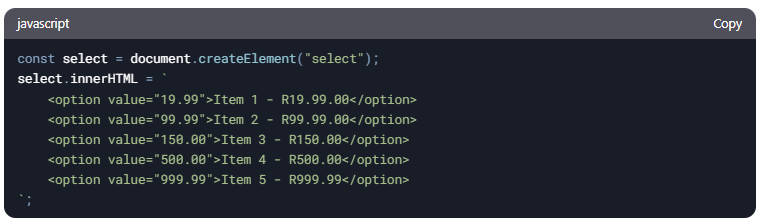
Products
Add or modify the products in the addLineItem() function:
VAT Rate
Change the VAT rate in the updateTotal() function:

Footer
Update the footer text and link in the generatePDF() function:

5. Dependencies
The Quote Generator relies on the following libraries:
- jsPDF: For generating PDFs.
- jsPDF-AutoTable: For creating tables in the PDF.
These are included via CDN in the <head> section:

6. Usage Instructions
- Open the Tool: Launch the index.html file in a web browser.
- Enter Customer Details: Fill out the form with the customer's information.
- Add Line Items:
- Click "Add Item" to add a new row.
- Select a product, enter the quantity, and the line total will update automatically.
- Download PDF:
- Click "Download Quote as PDF" to generate and save the quotation.
7. Troubleshooting
Issue: PDF Not Generating
- Ensure the form is filled out correctly.
- Check the browser console for errors.
- Verify that the jsPDF and jsPDF-AutoTable libraries are loaded.
Issue: Incorrect Calculations
- Ensure all line items have valid quantities and prices.
- Check the updateTotal() function for errors.
Issue: Logo Not Displaying
- Verify that the Base64 string for the logo is correct.
- Ensure the image format is supported (e.g., PNG).
8. License
The Quote Generator is open-source and free to use. You can modify and distribute it as needed.
Attribution is required and therefor you are not allowed to change the Copyright footer in the HTML as well as the Generated PDF Document.
For further assistance, contact support@clochenberg.co.za or visit the documentation page.